Projects
Modern iOS Real Estate App for a US Agency
real estate/
PropTech/
iOS/
mobile/
Swift/
UX/UI design/
MVP
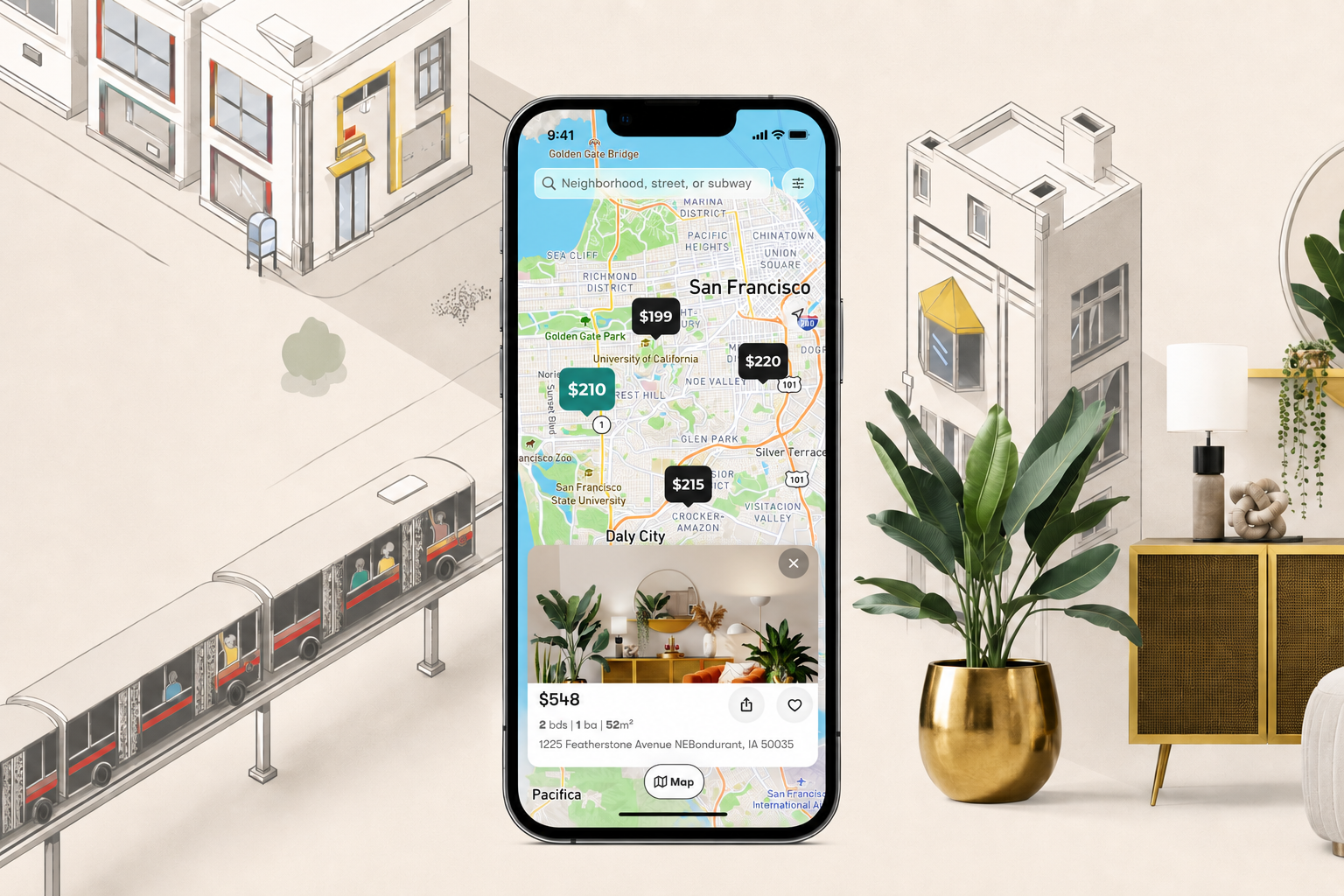
We partnered with a US real estate agency to design and develop a modern iOS mobile app for property discovery, saved searches, and direct lead conversion. The client wanted the MVP to feel premium and current, with an interface inspired by the new iOS liquid glass design language, while keeping the core real estate journey simple: browse properties on a map, compare listings, save favorites, track areas, and contact the agency from the listing page.
Our team supported the product from early wireframes through visual exploration, design system creation, MVP development, and testing. The result was a polished mobile foundation that gives the agency a stronger digital channel for buyers and renters in the US market.
About the project
Building a premium mobile channel for property search
The agency wanted to move beyond a standard listing experience and create a native-feeling iOS app that could represent the brand, simplify property exploration, and make it easier for users to act when they find a promising home. The app needed to support the way people naturally search for real estate: starting from a location, moving between map and list views, comparing property details, saving options, and contacting the agency when they are ready.
At the same time, the first release had to stay focused. Instead of trying to cover every possible real estate workflow, we defined an MVP around the highest-value user paths visible in the product screens: onboarding, map-based property discovery, listing cards, property detail pages, favorites, saved areas, inbox interactions, and contact flows.
Main goals for the MVP included:
- Create a modern iOS experience for a US real estate agency.
- Use a visual direction inspired by Apple's liquid glass interface style.
- Help users explore properties through both map and list views.
- Make listing details easy to scan, compare, save, and revisit.
- Support saved areas so users can monitor locations they care about.
- Provide simple communication and contact flows from inside the app.
- Build a scalable design system that could support future product iterations.
Core functionality planned for the first release
The MVP scope included a welcome and onboarding flow, home screen with map and list modes, property search by location, property preview cards, full listing details with photos and amenities, favorites, saved areas, an inbox tab for user communication, and direct contact actions for high-intent leads.
Approach
User-centered product definition
We began by turning the client's business goal into a practical MVP structure. The first step was to define the main user journeys: opening the app, searching around a location, switching between map and list views, opening a property, saving a listing, saving an area, and contacting the agency. This helped us keep the app focused on real actions rather than broad feature ideas.
Wireframes and user flows
Before investing in visual design, we created wireframes to map the core flows and screen hierarchy. These wireframes covered onboarding, the property discovery experience, listing previews, listing details, favorites, saved areas, inbox screens, empty states, and contact-related actions. The wireframes gave the client a clear view of the MVP and made it easier to discuss product logic early.
Design exploration
Once the structure was clear, we explored several visual concepts for the app. Each concept tested a different balance between real estate clarity, premium iOS styling, map readability, and brand personality. We compared approaches for color, typography, listing cards, map markers, buttons, bottom navigation, and property detail layouts before selecting the strongest direction.
Design system creation
After the preferred style was chosen, we built a design system for the MVP with color palettes, typography, icons, button states, navigation elements, property cards, listing modules, map controls, bottom bars, empty states, and reusable components. This helped keep the UI consistent across the home screen, property details, inbox, favorites, and saved areas.
Full UI screens for MVP
With the system in place, we designed the full set of product screens. The final UI covered the welcome experience, onboarding, authentication-related screens, home map, list view, property card states, listing details, filters and search interactions, favorites tab, saved areas tab, inbox tab, and contact flows. We also prepared screen states for situations like empty saved lists, incomplete user actions, and confirmation messages.
iOS MVP development
After design approval, we developed the iOS MVP around the agreed functionality. The implementation focused on the essential mobile experience: navigation, property browsing, map and list presentation, listing detail pages, saved items, saved areas, inbox-related screens, and lead actions such as contacting the agency from a property page.
Testing and polishing
We ran a testing round to validate the main flows and improve the experience before handoff. Testing focused on onboarding, navigation between tabs, property discovery, card interactions, saved items, saved areas, detail pages, contact actions, visual consistency, and behavior across iPhone screen sizes. After testing, we polished interface details and fixed issues that could interrupt the MVP journey.
Outcome
Premium iOS experience for real estate discovery
The final MVP gave the client a modern mobile product that feels aligned with current iOS design expectations. The app combines a clean visual system, glass-inspired UI elements, strong property imagery, and simple navigation so users can move through discovery without friction.
Map and list-based property browsing
The home experience supports the two most important real estate discovery modes: browsing properties on a map and reviewing them in a list. Users can search by area, inspect property markers, open listing previews, and switch to a more structured list view when they want to compare options more directly.
Property detail flow built for conversion
Listing pages were designed to make high-value information easy to scan: property photos, price, address, core attributes, amenities, description, nearby details, and contact actions. This gives potential buyers or renters enough context to decide whether to save a property or contact the agency.
Favorites and saved areas
The MVP includes flows for saving individual properties and managing saved areas. These features support repeat usage by helping users return to listings they care about and keep track of neighborhoods or zones that match their search intent.
Inbox and communication-ready flows
The app includes inbox-related screens and contact interactions so the product can support communication between users and the agency. These flows create a foundation for lead management and future improvements around messaging, notifications, or agent follow-up.
Reusable design system for future growth
The client received more than a set of screens. The design system, reusable components, and validated MVP structure make it easier to expand the product with advanced filters, listing alerts, user profiles, CRM integrations, agent dashboards, or Android support in future iterations.
Tested MVP foundation
By the end of the engagement, the client had wireframes, multiple visual concepts, a selected and refined design direction, a full UI system, implemented MVP functionality, and a tested mobile app foundation ready for the next release stage.
Our ratings stand strong across prominent marketplaces dedicated to sourcing business services


Based on 17 reviews


Based on 47 reviews






Contact
We're here to bring Your Vision to Life!
Tell us what you're building — a mobile app, an AI integration, or scaling an existing product. We'll map out the next steps with you.
- Free 30-minute discovery call — no commitment
- A real reply from our team within 24 hours
- NDA on request — your idea stays yours
Prefer email?
[email protected]Quick connect
Share a few details about your project and we'll get back to you with next steps.